OPC UA .NET Standard

dataFEED OPC UA .NET Standard Server & Client SDK

OPC UA

Easily enable your application with OPC UA

dataFEED OPC UA .NET Standard SDK enables fast integration of OPC UA communication into .NET Standard applications. Thanks to the .NET Standard library, you are not bound to Windows and can easily use your applications on other platforms, e.g. Linux. With the help of the clearly documented programming interface and associated sample applications, developers can concentrate on their actual project goals without having to worry about the intricacies of the OPC UA specification.

Complete Solution Addressing All Customer Requirements

  • Comprehensive set of building blocks offering encapsulation and easy-to-use functionality required for implementing OPC UA Clients and OPC UA Servers
  • Modular design to scale OPC UA functionality according to actual requirements
  • Wide range of available functionality, including Extended Security, Data Access, Complex Data, Events, Alarms & Conditions and Historical Access
  • Integrated security concepts allowing safe remote data transfer actively addressing modern security threats
  • Applicable for time-critical control tasks as well as for complex automation projects
  • OPC UA Clients capable to move data and information between factory floor and enterprise level

Comprehensive Scope of Delivery for Easy and Fast Development

  • Optimized Application Programming Interface (API) and easy to understand documentation
  • Complementary how-to example applications, step by step tutorials, complex test and simulation clients for a lean getting started with OPC UA development

Investment Security Through Innovative License Model

  • Implementation according latest OPC UA specifications
  • Free migration to upcoming dataFEED OPC UA SDK versions and 3 years’ right to updates to future versions
Technical Data
OPC Specifications OPC Unified Architecture V1.03
OPC Roles OPC UA Client, OPC UA Server
OPC UA Client/Server Profiles Core Characteristics, Data Access, Complex Data (OPC UA Client API), Base Eventing, Methods, Audit, Node Management, Historical Access, Alarms and Conditions, Publisher, Subscriber
OPC UA Transport OPC UA TCP transport; UA Binary Encoding
UADP Publisher, UADP Subscriber
OPC UA Security Security policy: Basic256Sha256/Basic256/Basic128Rsa15/None
Authentication: anonymous/user name and password/user certificate
Full compliance to OPC UA 1.03 specification
Programming Interface C#
Development Environment Microsoft Visual Studio 2015 (limited support), Microsoft Visual Studio 2017, .NET Framework 4.6, .NET Standard 1.4, .NET Standard 2.0
Development Operating Systems* Windows 7 SP1 (32/64 Bit), Windows 10 (32/64 Bit), Windows Server 2012 SP1, Windows Server 2012 R2, Windows Server 2016
Target operating systems* Windows 7 SP1 (32/64 Bit), Windows 10 (32/64 Bit), Windows Server 2012 SP1, Windows Server 2012 R2, Windows Server 2016,
all Linux distributions (tested with Ubuntu 16.04, Ubuntu Desktop, Debian 9.3), Android
Compliance/Certification Regularly tested at OPC Foundation interoperability workshops, test with OPC Foundation compliance test tool
Support Tools Comprehensive programming examples and tutorials, complex test and simulation OPC UA Server and Client applications, generic technology test and demonstration Client and Server tools
Trial Version Trial toolkit assemblies contain complete functionality. Limitation to 90-minute runtime period applies.
Trial version upgrades to unlimited functionality simply by using binary license activation key
Licensing Trial and evaluation license, single seat developer license (binary and source code version)
Applications integrating licensed toolkit libraries can be deployed in unlimited number of copies.

* Please contact the Softing sales representative for requests of different compilers or operating system variants.

  • dataFEED OPC UA Demo Client Package V2.00.0 (Free of Charge, Unlimited Runtime)
  • dataFEED OPC UA Demo Server Package V1.46.0 (Free of Charge, Unlimited Runtime)
  • OPC UA .NET Server & Client Toolkit OPC Foundation Lab Server Certificate
  • OPC UA .NET Server & Client Toolkit OPC Foundation Lab Client Certificate
  • dataFEED OPC UA .NET Standard Server & Client SDK Datasheet
  • dataFEED OPC UA .NET Standard Server & Client SDK, Release Notes V2.60.0
  • Migration Guide to dataFEED OPC UA.NET Standard SDK 2.60

Innovative Maintenance Contract

  • Optimized Application Programming Interface (API)
  • All Software Updates included
  • Support directly from our developers
  • No Royalty Fees
  • Available in Source Code and Binary
  • Unlimited runtime of the SDK past of Maintenance Contract

Fomation disponible….. Nous consulter
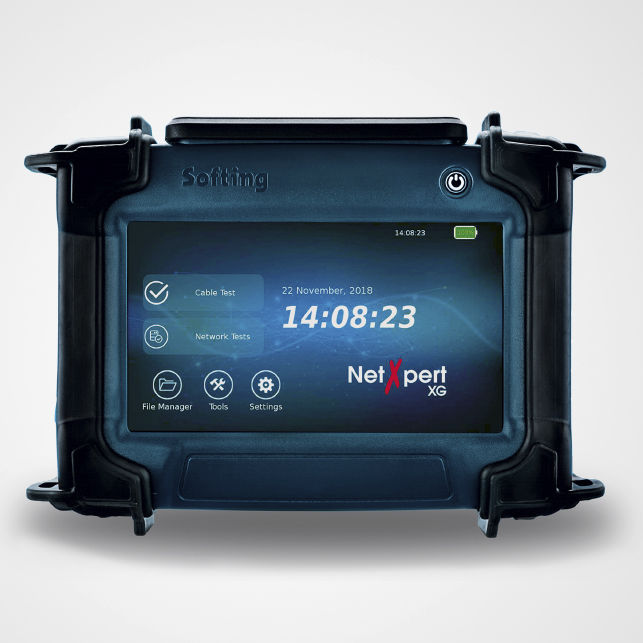
NetXpertXG

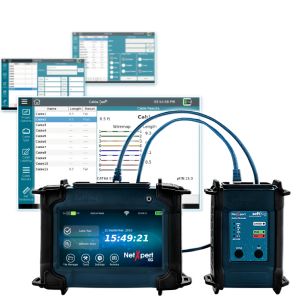
Test vos cables Ethernet et vérifie/garantie la vitesse limite de ces cables.

Les vitesses des  » Wireless Access points » dépassent souvent, les vitesses de cablage installé dans le réseau . Est il possible que vos cables gèrent des vitesses bien au delà de leurs spécifications ? Est il possible que vos cables CAT5e ou CAT6 puissent atteindre des vitesses de 1GBits/S voire 10Gbits/s

Pour le savoir, une simple fonction sur le NetXpert XG, permettent d’effectuer 3 tests. Effectue un test de vitesse en envoyant 1Gb/s de données via votre cable ( Test BERT ) et il prouvera si celui ci fonctionera au-delà  des spécifications et suivra la vitesse des « Access Points » installés

Le NetXpert est le seul testeur de cables et gestionnaire de réseaux actif a effectuer  un test de taux d’erreurs sur les bits ( BERT ) , un test de signal Signal/bruit ( SNR) et retard de vitesse de 1Gb/s, 5Gb/s ou 10Gb/s en appuyant sur une touche. Vous pouvez maintenant effectuer des tests de débit en temps réel pour valider vos cables jusqu’à 10Gb/s.

Test le taux d’erreurs, le bruit et le delai de propagation instantanément

En effectuant un test de taux d’erreur sur les bits ( BERT ) et selon les normes IEE802.3an, le NetXpert XG vous certifie ou non, une transmission de données sans erreur jusqu’à 10Gb/s

Test automatique avec une « touche » comprends le rapport Signal/bruit ( SNR) et le décalage temporel, qui peuvent avoir un impact significatif sur la transmission Gigabit

Le rapport « signal/bruit » vérifie que le bruit est suffisamment faible et que le signal est suffisamment élevé pour une transmission fiable. Le « delai de propagation » indique un décalage entre les paires de fils. Un retard excessif peut entrainer un sérieuse dégradation de la transmission et donc de la performance.

Les 3 mesures fondamentales pour déterminer si une transmission est fiable ou non, peuvent être effectuées à l’aide d’une seule touche. La mesure faite, vous pouvez réitérer immédiatement à l’aide de cette unique fonction. Chaque mesure est archivée et est fournis à un rapport de synthèse final au format PDF, CVS ou XML

The cable qualifier that is defining a new category — the cable project qualifier

If you are a cable installer, network owner, network builder, or system integrator, you’ll be excited to hear that NetXpert XG includes a project editor and auto test generator for up to 1000 cables, and test reports you can keep for your records or leave with your customer.  Once the tests are created, plug in the cable, click test, and NetXpert XG starts testing the cable to IEEE 802.3 standards to prove the speed of your cable.  Not only do you get a wiremap and cable length, NetXpert XG tests BERT, SNR, Delay Skew, distance to opens, shorts, or miswires.  As a bonus you get active network tests for copper, fiber, and wireless.  And, with 2 NetXpert XG local units, you can test fiber cables.

Cable Project Qualifier

  • Use the project editor, cable test editor, test label editor to pre-configure your cable testing projects
  • Press test to automatically sequence up to 1000 cable tests from the local or remote device to increase cable testing efficiency when working alone
  • Test data cabling for IEEE 802.3 compliance at data rates up to 10 Gb/s (BERT)
  • Determine signal-to-noise ratio (SNR) for compliance up to 10 Gb/s
  • Measure delay skew for compliance up to 10Gb/s
  • Measure length of cable with TDR and capacitance measurements for highly accurate test results and easier troubleshooting
  • Full-color wire map shows distance to open, distance to short, miswires, split pairs, and shield on a color graphical display
  • Save test results and generate standards-based measurement reports providing « Pass/Fail » indication in pdf, csv, or xml format

Perform active network management

  • Support for IPv4 and IPv6
  • Discover your network and see the connected network devices
  • Identifies defective PoE switches with a PoE load test
  • DHCP test
  • Ping lists can be defined and saved for later use
  • LLDP/CDP detection and analysis
  • Identifies VLANs present in your network
  • Data transfer from the tester to the PC using USB stick, wireless, or bluetooth connectivity
Length Measurement Technology Time-Domain Reflectometry (TDR) and capacitance
Cable Measurements Cable Testing and ID: up to 1,000 ft (305 m)
Split Pair Detection: 3 ft (1 m) to 1,000 ft (305 m)
Length Measurement: 0 to 1,500 ft (457 m), ± (5%+1ft (30 cm))
Distance to fault: 0 to 656 ft (200 m) ± (5% + 3ft (1m))
Supports 8 wiremap remotes (RJ 45) and 24 RJ-45 ID only
remotes
Power over Ethernet (PoE) Test supports IEEE 802.3af PoE (Type 1, max 15.4W),
IEEE 802.3at PoE+ (Type 2, 30W) and 802.3bt PoE++ (Type 3, 60W)
Future proofed for IEEE 802.3bt Type 4 100W higherpower PoE
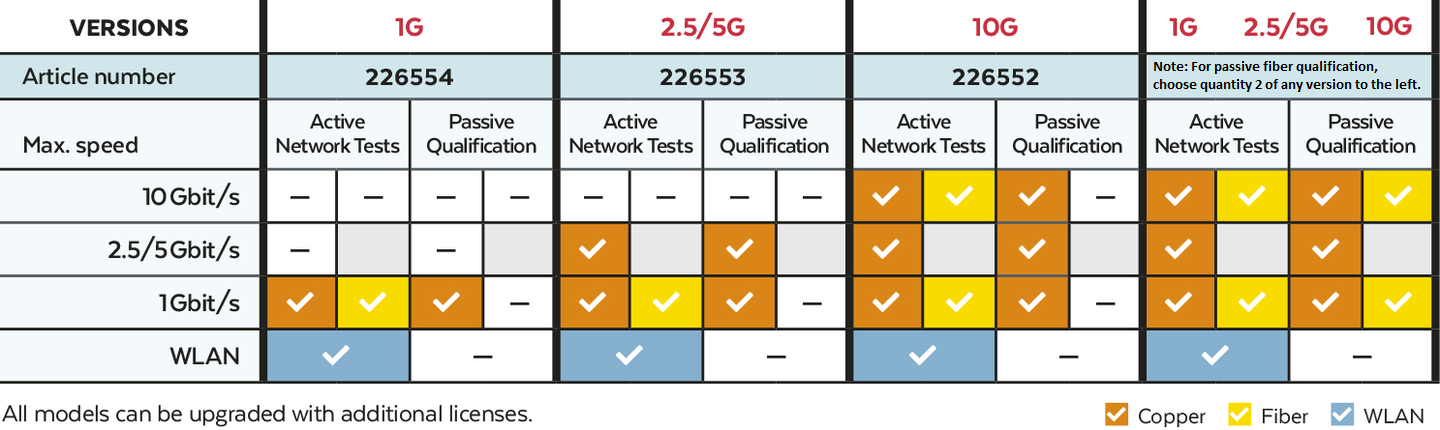
Active Ethernet Network and test support by interface:
Copper RJ-45 interface –100/1,000/2,500/5,000/10,000 Mb/sec link speeds
Fiber SFP+ #1 interface supports 10Gb/sec link speed
Fiber SFP+ #2 interface supports 1Gb/sec link speed
WiFi 802.11 a/b/g/n 2.4 Ghz WiFi and Bluetooth
Maximum Voltages Maximum voltage that can be applied to any 2 connector pins without causing damage to the tester:
RJ-45: 60 VDC or 50 VAC
Save Test Results Stores virtually unlimited cable or network tests with user defined names per project
Tone Generation Tone Frequencies: 730 Hz and 1440 Hz
Languages English, German, French, Spanish
Battery Li-Ion, 7.2 VDC, 3.1A-hr (typical)
Battery Life at 10Gb: 5 hrs minimum, 24 hrs stand-by
Temperature Operating: 14 to 140° F (-10 to 60°C)
Storage: -22 to 158°F (-30 to 70°)
Humidity 10 to 90% non-condensing
Enclosure Injection molded plastic
Display 7″ Color TFT-LCD capacitive touch display,
1024 x 600 resolution (WSVGA)
Size 245 x 177 x 73 mm (main unit)
130 x 177 x 55 mm (Active Remote)
Weight with Battery 2.6lbs (1.2 kg) main unit
1.3lbs (0.6 kg) Active Remote

mbGate PA

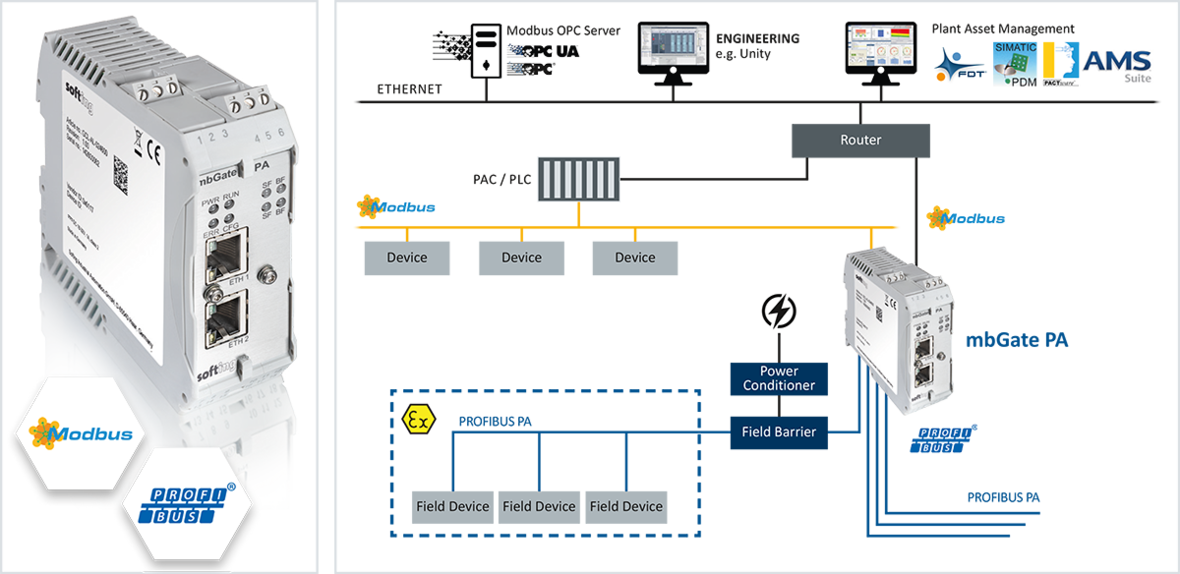
Passerelle : MODBUS TCP vers Maitre PROFIBUS PA

Connexion simple d’esclaves PROFIBUS PA à un système de contrôle Modbus via mapping interne I/O

Avec la passerelle mbGate PA, il est possible d’intégrer jusqu’à 4 segments PROFIBUS PA dans des systèmes de contrôle Modbus TCP. Il agit en tant que serveur TCP Modbus et maître PROFIBUS PA. Grâce à nos passerelles, les coûts d’ingénierie peuvent être réduits, car elle réutilise les alimentations « Power conditionners »  existants dans des projets de mise à niveau. Il permet la configuration, le paramétrage et la gestion des esclaves de l’installation à l’aide d’outils industriels standards.


Elément clef pour une transition à la pointe de la technologie

  • Simple remplacement de segments coupler PROFIBUS DP/PA
  • Ré utilisation de segments existant PROFIBUS PA, sans modificiations

Connectivité directe aux segments PROFIBUS

  • Fonctionne comme serveur MODBUS et Maître PROFIBUS PA.
  • Connecte jusqu’à 4 segments PROFIBUS PA à MODBUS TCP

Configuration, Parametrisation et Gestion des esclaves en utilisant les outils standards industriels

  • Supporte la majorité des outils Modbus comme Schneider Unity Pro ou TIA Portal de Siemens
  • Incluant CommDTM et permetant l’utilisation des logiciels  » Frame applications »  FDT/DTM.
  • Parametrization des esclaves basés sur EDD, utilisant le logiciels Siemens Simatic PDM

Scope of Delivery
Hardware mbGate PA Gateway
Documentation On Website
Order Numbers
GCA-EL-024802 mbGate PA, Modbus TCP to PROFIBUS PA Gateway. Supports up to 2 PA segments (up to 32 PA devices).
GCA-EL-024804 mbGate PA, Modbus TCP to PROFIBUS PA Gateway. Supports up to 4 PA segments (up to 64 PA devices).
Additional Products and Services
LRL-DY-134501 dataFEED OPC Suite, Version 4.01 and higher, including all supported PLC protocols, support for OPC UA, access for any number of dataFEED OPC Tunnel Clients, for simultaneous access to a total of up to 100 OPC UA Servers, OPC Servers and OPC Tunnel Servers, and many more Functionalities such as Database and File Access, Data Exchange, Optimizer, Concentrator and Bridge
GCA-EN-024806 mbGate DP, Modbus TCP to PROFIBUS DP-Gateway. Support of 1 PROFIBUS DP segment (RS485).
GCA-EN-024808 mbGate PB, Modbus TCP to PROFIBUS Gateway. Supports 2 PA segments (up to 32 PA devices, MBP physical layer) and 1 PROFIBUS DP segment (RS485).

Retrouvez tous les téléchargements SOFTING  sur notre mirroir #1

dataFEED Exporter

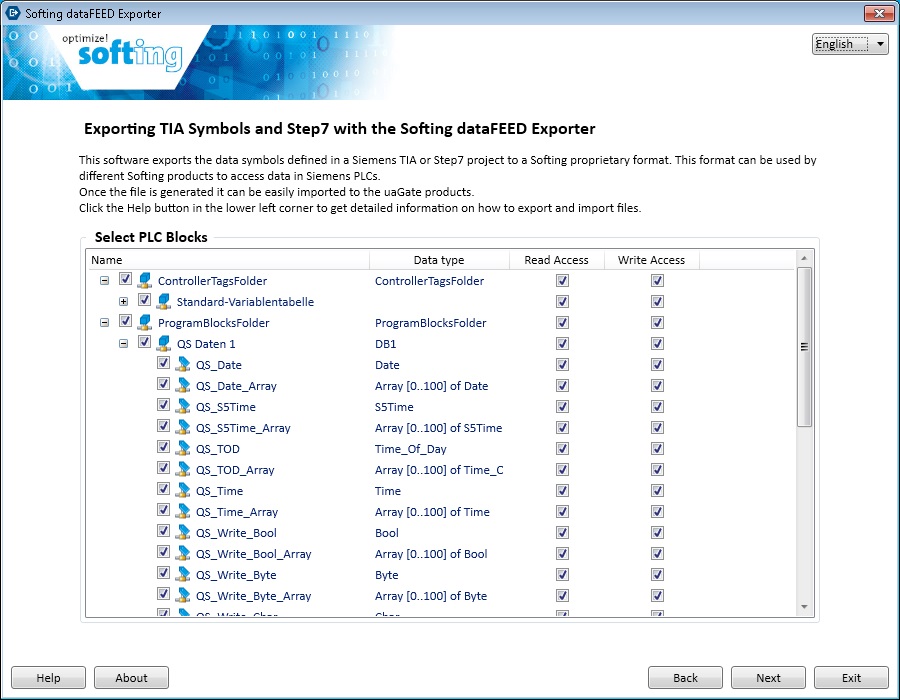
dataFEED Exporter : Export of Siemens Symbols from TIA Portal or STEP 7

Simple Symbol Export

  • Export of symbolic names from Siemens TIA Portal and SIMATIC STEP 7 projects
  • No TIA Portal or STEP 7 know-how required for exporting symbol information
  • Selection of data blocks to be available via Softing products
  • Later adjustment of .sdfi file by adding/deleting individual symbols
  • Chance for changing symbol names afterwards
  • Smart wizard for export in a few steps
  • Display of symbol and syntax information via tooltips

Secure Encrypted Softing Symbol File

  • Creation of encrypted symbol files for import into Softing products
  • Output of exported symbols into encrypted secure .sdfi file
  • Full protection of Siemens project as only symbol information is stored
  • Chance to assign of read / write attributes for exported symbols at later stage

Perfect Addition to Softing Products

  • Software usable with dataFEED OPC Suite, dataFEED OPC Server Siemens, uaGate SI, edgeGate and echocollect e/r/m
  • Installation of dataFEED Exporter on the TIA computer required for export (Openness interface)
  • Free of charge when using Softing products
  • Supporting all current Windows operating systems as well as virtual environments

DataFEED Exporter

  • Simple item syntax export out of Siemens STEP 7 and TIA Portal projects
  • Generation of encrypted symbol file, for import into Softing products
  • For use with dataFEED OPC Suite, uaGate SI, edgeGate and echocollect e/r/m
Supported Controllers Siemens S7-300/400/1200/1500
Supported Engineering Tools SIMATIC STEP 7, TIA-Portal V13/V14/V15 including Service Packs
Supported Operation Systems Windows 7, Windows 8, Windows 8.1, Windows 10
Windows Server 2003, Windows Server 2008, Windows Server 2008 R2, Windows Server 2012, Windows Server 2012 R2, Windows Server 2016
Supported Data Types Bool, Byte, Char, Word, Int, DWord, Dint, Real, Date, Time_Of_Day, Time, S5Time, Date_And_Time, String, UInt, USInt, UDInt, Sint, Struct, 0xFFFF (Folder)
Licensing Free when using Softing products
Suitable for echocollect e/r/m, uaGate SI, edgeGate, Industrial IoT Starter Kit, dataFEED OPC Suite, dataFEED OPC Server Siemens
File size 85 MB
Output Encrypted secure Softing .sdfi data file

Software

Manuals & Documentation


Retrouvez tous les téléchargements SOFTING  sur notre mirroir #1

dataFEED Secure Integration Server

Serveur : dataFEED Secure Integration

Intégration IT/OT : Solution Sécurisée et fléxible basée sur l’OPC UA

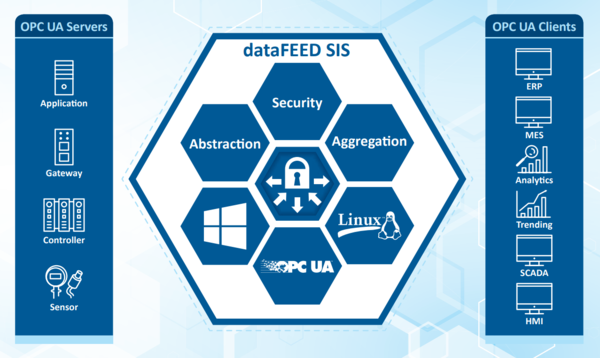
dataFEED Secure Integration Server provides a powerful OPC UA data integration layer. Based on the OPC UA aggregation server users implement flexible solutions combining the various OPC UA Servers at automation level with their associated address spaces and making the data available to IT applications via a consistent OPC UA interface. dataFEED Secure Integration Server covers the full range of OPC UA security features and enables the implementation of state-of-the-art security solutions.

The interface abstraction of dataFEED Secure Integration Server enables continuous adaptation and scaling of OPC UA-based IoT solutions throughout their entire lifecycle. Users gain a high degree of flexibility and at the same time significantly reduce integration and configuration costs.

Secure Communication

  • Support of all safety functions of OPC UA standard
  • Provide different data for different users and applications
  • Support for multiple OPC UA Endpoints (client or server), each with its own certificates
  • Filtered access, depending on IP address (White List / Black List for OPC UA Endpoints)
  • Detection of DoS (Denial of Service) attacks on OPC UA authentication

Data Aggregation

  • Aggregation of data from multiple sources in a server (aggregation of OPC UA Namespace)
  • Application access to aggregation servers, not to many individual data sources
  • Extensive and flexible OPC UA Service-based address space filtering, down to OPC UA Item level
  • Reduced configuration effort (Configuration not required individually for each OPC UA data source and each OPC UA Client)

Interface Abstraction

  • Common, stable OT interface for different IT applications
  • Adaptations in automation network transparent for IT applications
  • Easy integration of IT applications with standard OPC UA Clients in different OT environments
  • Decoupling of investment decisions in IT and OT environment

Solutions for Edge Architectures

  • Edge solution with features and benefits identical to those resulting from using central cloud platforms
  • Running local clients (e.g. for edge analytics) in parallel with cloud-based applications
  • Start with small IoT solution on cloud basis, later adaptation and expansion over time possible
Key Functionality OPC UA Aggregation Server
OPC UA Namespace aggregation, 50 virtual namespaces maximum
OPC UA Server with up to 25 OPC UA Server endpoints, 50 users per endpoint, separate application certificate per endpoint
OPC UA Client with up to 100 connections to OPC UA Servers, separate application certificate per OPC UA connection
Up to 500,000 data changes per second
Supported OPC Specifications OPC Unified Architecture V1.03
OPC Roles OPC UA Client, OPC UA Server
OPC UA Profiles Data Access, Complex Data, Methods
OPC UA Transport TCP Transport, UA Binary Encoding, UA Secure Conversation
HTTPS Transport, UA Binary Encoding
OPC UA Security Security methods:
Aes256Sha256-RsaPss
Aes128SHA256-RsaOaep
Basic256Sha256
Basic256
Basic128Rsa15
NoneAuthentification:
Anonymous
user name and password
certificate
OPC UA Firewall OPC UA Service-based address space filtering, down to OPC UA Item level
Limitation of OPC UA Client conncetions
Restriction of OPC UA services
IP access filter (White List/Black List)
Detection of denial of service (DoS) attacks on OPC UA authentication
OPC Certification Test based on compliance test tools of OPC Foundation
Operation Mode Windows service
Logging, Diagnostics Detailed system and test logging
Test tools: OPC UA .NET Demo Server, OPC UA Demo Client
Supported Operating Systems 64 Bit operating systems only
Windows 7, Windows 8.1, Windows 10, Windows Server 2012, Windows Server 2012 R2, Windows Server 2016
Linux on demand
Licensing Runtime license per computer
Single Seat License
LRL-DY-140001 dataFEED Secure Integration Server, version 1.01, single seat license for up to 10 OPC UA connections,
including maintenance and support contract for 1 year
LMA-DY-140001 dataFEED Secure Integration Server maintenance and support contract for 1 year, for up to 10 OPC UA connections
LRL-DY-140004 dataFEED Secure Integration Server, version 1.01, single seat license for up to 100 OPC UA connections,
including maintenance and support contract for 1 year
LMA-DY-140004 dataFEED Secure Integration Server maintenance and support contract for 1 year, for up to 100 OPC UA connections
Use License
LRL-DY-141001 dataFEED Secure Integration Server, version 1.01, use license for up to 10 OPC UA connections,
including maintenance and support contract for 1 year
LRL-DY-141004 dataFEED Secure Integration Server, version 1.01, use license for up to 100 OPC UA connections,
including maintenance and support contract for 1 year

Scope of Delivery

Software License key for dataFEED Secure Integration Server, link for software download
Documentation Online help in English

Additional Products and Services

LRL-DY-134501 dataFEED OPC Suite
GAA-DX-145111 uaGate SI
GAA-YE-145133 uaGate MB
100-1030-01 Training ”OPC Server and Client in Practice”

OPC UA .NET Server & Client

dataFEED OPC UA .NET Server & Client SDK for Windows

OPC UA .NET Server & Client

Fast Time-to-Market for OPC UA Clients and Servers

  • OPC UA Communication Integration in Windows-based Automation Environments
  • Comprehensive Functionality Provided by Libraries
  • Optimal Total Costs of Ownership Through All-In-One License Model

Complete Solution Addressing All Customer Requirements

  • Comprehensive set of building blocks offering encapsulation and easy-to-use functionality required for implementing OPC UA Clients and Servers for Windows environment
  • Modular design to scale OPC UA functionality according to actual requirements
  • Wide range of available functionality, including Extended Security, Data Access, Complex Data, Events, Alarms & Conditions and Historical Access
  • Integrated security concepts allowing safe remote data transfer actively addressing modern security threats
  • Applicable for time-critical control tasks as well as for complex automation projects
  • OPC UA Servers and Clients capable to move data and information between factory floor and enterprise level

Comprehensive Scope of Delivery for Easy and Fast Development

  • Optimized Application Programming Interface (API) and easy to understand documentation
  • Complimentary how-to example applications, step by step tutorials, complex test and simulation clients and servers for a lean getting started with OPC UA development

Investment Security Through Innovative License Model

  • Implementation according latest OPC UA specifications
  • Free migration to upcoming OPC UA Development Toolkit versions thanks to toolkit software and 3 years‘ right to updates to future versions
OPC Specifications OPC Unified Architecture V1.03
OPC Roles OPC UA Client, OPC UA Server
OPC UA Client/ Server Profiles Core Characteristics, Data Access, Complex Data, Base Eventing, Methods, Audit, Node Management, Historical Access, Alarms and Conditions, Redundancy
OPC UA Transport OPC UA TCP transport; UA Binary Encoding SOAP/HTTP transport: UA Binary and XML encoding HTTPS transport; UA Binary and XML encoding
OPC UA Security Security policy: Basic256Sha256/Basic256/Basic128Rsa15/None
Authentication: anonymous/user name and password/user certificate
Full compliance to OPC UA 1.03 specification
Programming Interface C#
Development Environment* Microsoft Visual Studio 2010, Microsoft Visual Studio 2012, Microsoft Visual Studio 2013, Microsoft Visual Studio 2015, Microsoft Visual Studio 2017, .NET Framework 4.0, .NET Framework 4.5, .NET Framework 4.6, .NET Framework 4.7
Development /Target
Operating Systems*
Windows 7 (32 Bit and 64 Bit), Windows 8.1 (32 Bit and 64 Bit), Windows 10 (32 Bit and 64 Bit), Windows Server 2008 RS2, Windows Server 2012, Windows Server 2016
Compliance/Certification Regularly tested at OPC Foundation interoperability workshops, test with OPC Foundation compliance test tool
Support Tools Comprehensive programming examples and tutorials, complex test and simulation OPC UA Server and Client applications, generic technology test and demonstration Client and Server tools
Trial Version Trial toolkit assemblies contain complete functionality. Limitation to 90-minute runtime period applies.
Trial version upgrades to unlimited functionality simply by using binary license activation key
Licensing Trial and evaluation license, single seat developer license (binary and source code version)
Applications integrating licensed toolkit libraries can be deployed in unlimited number of copies.
ATV-LMA-DD-031101 Maintenance and support contract for OPC UA .NET Client Development Toolkit, 3 years minimum period, based on yearly fee, including single seat developer license WRL-DD-031101, binary format
ATV-WRL-DD-031101 OPC UA .NET Client Toolkit, single seat developer license, binary format, available only in combination with LMA-DD-031101
ATV-LMA-DD-031102 Maintenance and support contract for OPC UA .NET Server Development Toolkit, 3 years minimum period, based on yearly fee, including single seat developer license WRL-DD-031102, binary format
ATV-WRL-DD-031102 OPC UA .NET Server Toolkit, single seat developer license, binary format, available only in combination with LMA-DD-031102
ATV-LMA-DD-031201 Maintenance and support contract for OPC UA .NET Client Development Toolkit, 3 years minimum period, based on yearly fee, including single seat developer license WQL-DD-031201, source code format
ATV-WQL-DD-031201 OPC UA .NET Client Toolkit, single seat developer license, source format, available only in combination with LMA-DD-031201
ATV-LMA-DD-031202 Maintenance and support contract for OPC UA .NET Server Development Toolkit, 3 years minimum period, based on yearly fee, including single seat developer license WQL-DD-031202, source code format
ATV-WQL-DD-031202 OPC UA .NET Server Toolkit, single seat developer license, source format, available only in combination with LMA-DD-031202
ATV-LEA-DD-030300 Site License extension for OPC Development Toolkits

Scope of Delivery

Software Installation package on Softing OPC Toolkits DVD-ROM, installation package available for download
Support Dedicated Support Team
Documentation Online Help in English in CHM Format as Part of the Installation Package

Additional Products and Services

ATV-OPC-ENTW-TAG OPC Engineering / Consulting / Compliance Assistance
ATV-TRA-OPC-UA OPC UA Introductory Training for Decision Makers and Technical Leaders
ATV-TRA-OPC-UA-DEV OPC UA .NET Developer Training
ATV-WRL-DD-031105 OPC UA Model Designer
ATV-LRL-DY-134501 dataFEED OPC Suite, Version 4.01 and higher

Logiciel datacheck analyzer : pour diagnostic Ethernet industriel

Analyzer IE / PRO

Software for Mobile Diagnostics and Acceptance Testing of Industrial Networks

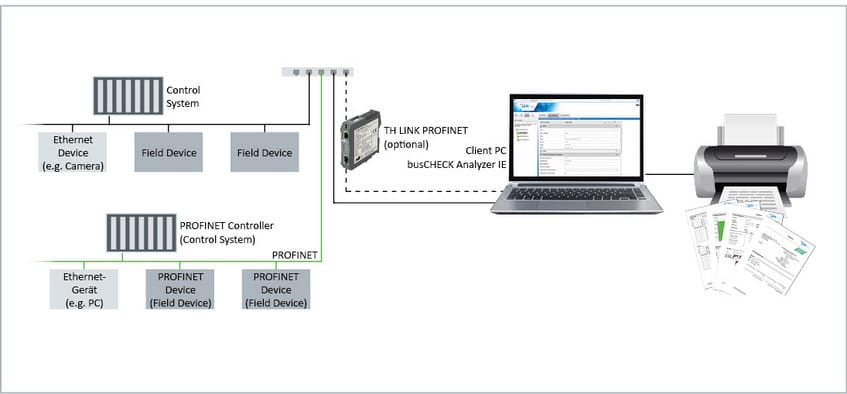
Analyzer IE / PRO is a comprehensive software solution for acceptance testing and efficient troubleshooting of Ethernet-based industrial communication. In a PROFINET environment, the mobile diagnostic tool generates standardized acceptance reports in accordance with the recommendations of PROFIBUS & PROFINET International (PI), making it an easy-to-use product that is tailored to the needs of plant suppliers, maintenance personnel as well as service providers.

Comprehensive Functionality

  • Diagnostics list, error statistics, network statistics
  • Enhanced flexibility by supporting online as well as offline mode
  • Generation, analysis and handling of diagnostic data such as graphical topology, inventory list and reference measurements, also for standard Ethernet components (eg PCs, camera systems)

Automated Generation of Acceptance Test Documents

  • Time saving by automatically created test reports
  • Flexible definition of acceptance criteria
  • Transparent reporting by following PI guidelines

Tool Addressing Complete Plant Lifecycle

  • Data on network configuration, network communication and diagnostic messages
  • Error identification for effective troubleshooting (e.g. based on inventory list of network devices)
  • Chance to support exchange of general project information between end users, EPC contractors, system integrators and maintenance service providers
  • Seamless integration with Softing diagnostics per-manent monitoring solutions TH SCOPE and TH LINK
Technical Data
Functionality
  • Analysis of device logs
  • Live list, statistics, inventory
  • Topology and trend analysis
  • GSDML file support, plaintext messages in diagnostic list
  • Acceptance measurements and acceptance reports
  • Reference comparison
  • Configurable time intervals for automated export of inventory and topology data
  • Data export via Excel
  • Configurable Blacklist feature for robust operation
  • Optional (Analyzer PRO): Telegram analysis: jitter, refresh interval, load ratio
Supported Protocols PROFINET, EtherNet/IP, Modbus TCP
Interfaces
  • SNMP Agent
  • OPC UA Server
System Requirements Adobe Reader 8 or higher for reading the documentation and for printing the topology
Supported Operating Systems Windows 7, Windows 8.1, Windows 10
Windows Server 2012, Windows Server 2012 R2, Windows Server 2016
Network Access Data collection through TH LINK PC (PROFINET, EtherNet/IP, Modbus TCP)
Demo Version Full TH SCOPE functionality can be used for free for 30 days after installation
Licensing Software or hardware key
Scope of Delivery
Software Analyzer IE
License Software key (bound to PC) or hardware key
Hardware profiTap: Network tap for telegram analysis operation, optional (Analyzer PRO)
Documentation Installation manual, user manual, release note
Order Numbers
LRA-JY-003041 Analyzer IE (software key)
LRL-JY-003042 Analyzer IE (hardware key)
KPL-JY-003043 Analyzer PRO
Additional Products and Services
GEA-JN-003006 TH LINK PROFIBUS
GDA-JA-003034 TH LINK PROFINET
GDA-JY-003037 TH LINK Industrial Ethernet
LRA-JY-003028 TH LINK PC Industrial Ethernet
TRA-PB-TECH Training “PROFIBUS Technology”
TRA-PB-TS Training “PROFIBUS Troubleshooting with exam to Certified PROFIBUS Installer”
TRA-PN-CERTINST Training “PROFINET Acceptance and Commissioning”
TRA-PN-CERTENG Training “PROFINET Technology graduated as Certified PROFINET Engineer”
TRA-PN-TOOLS On-site training: PROFINET tools

Pour les formations, veuillez nous contacter

Les personnes intéressées par ce produit, peuvent être aussi interessées par :


PB-IF-03

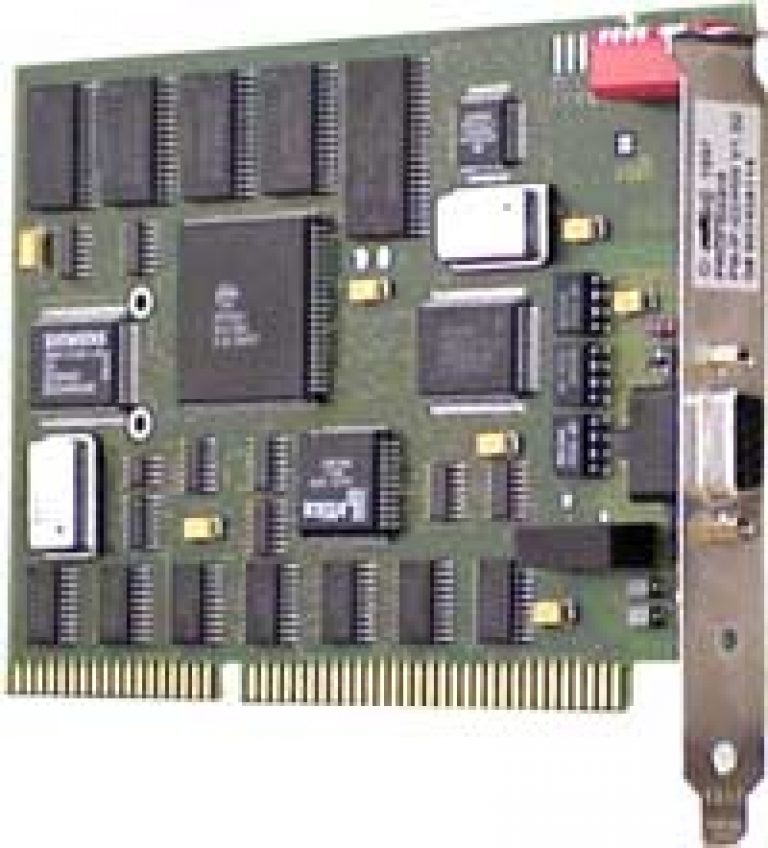
PB-IF-03 : Carte Profibus, 1 canal, format ISA

S5 PCLink

PROFIboard une carte PC intéligente dans un réseau PROFIBUS DP. Elle est facile d’utilisation

Des applications tel que HMI, SCADA, interface ou controleur PC, peuvent accéder facilement aux réseaus PROFIBUS DP, grâce à cette carte.

. PB-IF-03

  • Carte Profibus  : 1 canal format : ISA

  • Specific ; ISA spec

  • Température d’utilisation : [ 0°C / +55°C]

  • Carte rapide à mettre en Oeuvre

  • Support de protocoles variés

Unit PB-IF-03

ISA PC-board, short AT format.

CPU Siemens SAB-C165 Microprocessor
Memory 512-Kbyte Flash, 512 Kbyte SRAM, 16 Kbyte dual port RAM
SUpported PC Interrupts 5,10,11,12,15
Profibus ASIC Siemens ASPC2 and SPC3
Physical Interface Galvanically isolated RS-485

Connector Type

1 x 9 pin Sub-d female
Connector Pinning EN 50 170, part 2 compliant
Hardware Configuration I/O address is set by switch on board; all other settings are software configurable
Power Supply +5 V (+-5%; typ. 700mA
Transfer Rate 9.6KKbit/ up to 12 Mbit/s
Humidity Rating <90% non-condensing
Temperature 0-55C Operating temperature

Reference :  PB-IF-03

Cette carte n’est plus en production. Veuillez vérifier sa disponibilité

dataFEED OPC Classic SDK

dataFEED OPC Classic SDK

dataFEED OPC Classic SDK

dataFEED OPC Classic SDK / OPC DA SDK

  • OPC Classic Softing pour communication avec les environnements « Automatisme »
  • Interface de programmation d’applications optimisée
  • Fonctionalités étendues; disponibles sous forme de librairies

Performance éprouvée

  • Continuously enhanced since 1997 in response to evolving technologies
  • In use in several thousand OPC products at more than 1,600 companies around the world
  • Ideal for time-critical control tasks as well as complex projects comprising several hundred thousand items
  • Fitting to wide range of Windows development environments and target systems

Interface d’intégration facile et rapide

  • Intuitive C++ and .NET API
  • Integrated wizards for easy application generation
  • Quick start with easy-to-understand documentation, tutorial and sample projects

Mise en service de votre application : très rapide

  • Extensive OPC DA and OPC AE library, adapted to customer requirements
  • Automatic generation of OPC project
  • Complete functionality for accessing OPC Namespace or Event Area, OPC Items as well as for event and method call handling
  • Only implementation of product-specific business logic required, no need to learn details of OPC specifications or DCOM and SOAP technologies
  • Saving of several months of work
OPC Specifications OPC Data Access V1.0a, V2.05, V3.0, OPC Alarms & Events V1.10
OPC Roles OPC Client, OPC Server
OPC Transport DCOM for OPC Data Access and Alarms & Events
OPC Security Partial Support of OPC Security Custom Interface V1.00
Programming Interface C++, C#, Visual Basic .NET
Development Environment Microsoft Visual Studio 2008, Microsoft Visual Studio 2010, Microsoft Visual Studio 2012,
Microsoft Visual Studio 2013, Microsoft Visual Studio 2015, Microsoft Visual Studio 2017,
.NET Framework 3.5, .NET Framework 4.0, .NET Framework 4.5, .NET Framework 4.6
Development Operating Systems Windows 7, Windows 10
Windows Server 2008 RS2, Windows Server 2012
Target Operating Systems* Windows 7 (32 Bit, 64 Bit), Windows 8 (32 Bit, 64 Bit), Windows 10,
Windows Server 2003, Windows Server 2008 RS2, Windows Server 2012, Windows Server 2016
OPC Compliance / Certification OPC Foundation Test Lab certification for Demo Server and Demo Client
Regularly tested at OPC Foundation Interoperability Workshops
Successful pass of test with OPC Foundation Compliance Test Tool
Programming Support Wizard for automatic creation of OPC Client or OPC Server framework application
Comprehensive programming samples and tutorials
OPC Demo Client and Server with unlimited functionality and unlimited runtime available for testing and demonstration purposes
Trial Version Trial toolkit assemblies contain the complete functionality. Limitation to 90-minute runtime period applies.
Trial version upgrades to unlimited functionality in binary format simply by using the binary license activation key
Licensing Single Seat Developer License for specific OPC Toolkit features in source and binary Format
OPC-enabled applications based on source or binary format license can be deployed without limitations

* Please contact your sales representative for support of different compilers or operating system variants.
dataFEED OPC Classic SDKs are known to work on several platforms such as Windows CE, Linux, VxWorks, etc.

WRL-DD-034101 / WQL-DD-034201 Client OPC DA Classic : licence développeur « toolkit », format binaire /  format source
WRL-DD-034111 / WQL-DD-034211 Client OPC AE Classic : licence développeur « toolkit », format binaire /  format source
WRL-DD-034102 / WQL-DD-034202 Serveur OPC DA Classic : licence développeur « toolkit », format binaire /  format source
WRL-DD-034112 / WQL-DD-034212 Serveur OPC AE Classic : licence développeur « toolkit », format binaire /  format source
SIA-DD-030400 Services d’intégration sur plateforme choisi par le client
LEA-DD-030300 Licence « Site extension »  pour  dataFFED OPC SDKs
LMA-DD-034000 Service et contrat de support pour le dataFFED OPC Classic SDKs

  • dataFEED OPC SDK, Client DA, format binaire : LMA-DD-034000-034101
  • dataFEED OPC SDK, Client AE, format binaire : LMA-DD-034000-034111
  • dataFEED OPC SDK, Serveur DA, format binaire : LMA-DD-034000-034102
  • dataFEED OPC SDK, Serveur AE, format binaire : LMA-DD-034000-034112

Ce que vous recevrez…

Logiciel Logiciel à installer OPC Toolkits SDK sur DVD-ROM. Installation disponible également par téléchargement
Support Support technique dédié
Documentation « Online Help » en anglais au format CHM, que vous retrouverez sur l’installation su logicieml

Produits additionnels et services:

OPC-ENTW-TAG OPC engineering / consulting /  assistance

S5 PCLink

Passerelle Ethernet pour contrôleur SIMATIC S5

Integration simple et rapide de la technologie S5 dans une technology Ethernet. Programme ent affichage STEP5  avec capture de données « Process », en même temps avec un seul controleur. Les données S5 peuvent être accédées directement via SIMATIC S7

S5 PCLink
S5 PCLink

Space-Saving and Quick to Connect

  • Ultra compact Ethernet gateway in 15-pin D-sub housing
  • Connection to controller via programming interface
  • Powered by controller or external power supply
  • Connection to Ethernet typically via hubs or switches
  • Status display via LED

Easy Configuration for Both Local and Remote Access

  • Support of 10/100 Mbit/s Ethernet with automatic detection
  • IP address assignment either through manual configuration or from DHCP server
  • Connected SIMATIC S5 reachable via Ethernet, directly on site or from remote network computer on the network

Data Integration Without Changes to Control Program

  • Communication synchronized with PLC allowing parallel access to SIMATIC S5 data by multiplexing
  • No need for interrupting application in favour of another
  • STEP5 programming via Ethernet and virtual COM interface
  • Reading and writing of data from SIMATIC S7 controllers supporting TCP/IP PUT/GET without changes to SIMATIC S5 project
  • Optional access to controller data via OPC Server
Supported S5 controllers SIMATIC S5 AG 90U … SIMATIC S5 AG 155U
S5 data types E, A, M, DB, Z, T
PLC interface SIMATIC S5 programming device port, 15-pin connector, 9.6 KBaud
Ethernet interface RJ45, 100 Mbit/s and 10 Mbit/s, automatic detection
Communication types AS511,
RK512 (programming device connection through STEP5 and virtual COM port)
ISO (H1),
ISO on TCP (RFC 1006),
DHCP
IP address Manually configurable, via DHCP server, auto IP
Supported Software Softing S7/S5 OPC Server
Siemens STEP5
OPC Clients, e.g. Citect, InTouch, RSView, WinCC
Power supply 24 VDC, 80 mA, from SIMATIC S5 controller or external
Dimensions (H x W x D) 42 mm x 15 mm x 65 mm
System requirements PC/programming device with Windows 98/Windows NT/Windows 2000/Windows XP and 10/100 MBit Ethernet
S5-PCLink S5-PCLink

Scope of Delivery

Hardware S5-PCLink gateway
Documentation Printed quick reference guide, manual on CD-ROM

S5-PCLink

Step5 displays « Error 0334 » when I want to establish a connection via the S5-PCLink

Please download and install the software patch s5vir122.exe from our download area.

I cannot change any settings in the S5-PCLink (e.g. IP address, name, etc….) with the S5-LanManager

Firmware version 1.03 or newer is installed in the S5-PCLink (check S5-LanManager).

Please download an update of the S5-LanManager from our web site. Replace the installed files (C:\Program Files\Softing\S5-PCLink\… ) with those from the S5LanManager_update.zip file.

Communication with the PLC is sporadically broken or cannot be established at all

On S5 PLCs of type S5U115-944 and -928B, the power sources needed by our S5-PCLink are often defective. This is indicated by a failure to connect to the PLC (green LED on S5-PCLink flashes once approx. every 4 seconds) or a broken connection at irregular intervals.

Pinging the S5-PCLink works.

Solution:
You will need a power source adapter that can be added between the PLC and the S5-PCLink, and provides the power sources.
Please contact our sales department if you need this adapter.

What is the default IP address of the S5-PCLinks (factory setting)

There is no default IP address setting. The IP address is automatically assigned by the DHCP server per default.

If there is no DHCP server available, then the module will use a random address from the IP address space 169 – … (after about 1 minute).

In case the device will not be shown in the S5-LAN-Manager then connect it directly with a crossover network cable and your PC. Please disable the Firewall. You can then configure the device in the S5-LAN-Manager. (For the operation mode this function is not necessary).

S5-PCLink is not found in the S5-LAN-Manager

Possible causes:

  • IP address / port is blocked by the firewall . Please disable the firewall and then search again in the S5-LAN-Manager. Ports see below.
  • A virus scanner could also block the communication, so please turn off the virus scanner.
  • There is a router between the PC and the module (especially NAT router), which does not forwards the search to the broadcasts.
  • If a VPN connection is used then the required ports must be free.


Ports

  • 65467 (UDP): Search S5-LAN by S5-LAN-Manager/PLCVCOM
  • 65467 (TCP): Search S5-LAN by S5-LAN-Manager/PLCVCOM
  • 10010 (TCP):  PG port ( PLCVCOM )
  • 2002  (TCP): S5 server port ( VIPA )
  • 102   (TCP): S5 server port ( RFC1006)


Les personnes intéressées par ce produit peuvent aussi être intéressées par :